CI/CD pipelines
Základy softvérového inžinierstva a DevOps
Sergej Chodarev (sergejx.net)
CI/CD
- Continuous Integration (CI)
- fast integration of changes, avoiding long-living branches
- Continuous Delivery (CD)
- automation of release process, including testing and deployment
- deployment pipeline
- Continuous Deployment
- actually deploying every change in production automatically
CI/CD Services
- Tools for automate deployment pipeline
- Build, test, deploy
- Examples: GitHub Actions, GitLab CI, Jenkins, TeamCity
GitLab CI/CD
- CI/CD pipeline automation integrated in GitLab
- Run pipelines on every push, merge request, or schedule
- Configuration:
.gitlab-ci.yml file in the root of the repository
YAML
- Data serialization language
- Writable and readable by humans
- Structure is defined by indentation
key: value
nested:
  person:
    name: John
    age: 30
list:
  - item 1
  - item 2
inline-list: [item 1, item 2]
strings: "hello world"
quotation-marks: not required
numbers: 42
booleans:
  - true
  - false
  - yes
  - no
# Comments
Caveats
- Indentation is important
- No tabs allowed, only spaces
- Quotation for strings is sometimes required:
- special characters (e.g.
:, #, -)
- numbers
- booleans (e.g.
yes, no, true, false)
Stages
- Define the order of execution of jobs
stages:
  - build
  - test
  - deploy
Jobs
- Specify tasks to be executed
compile:
  stage: build
  script:
    - echo "Compiling the code..."
    - gcc main.c -o main
GitLab Runners
- Separate services executing the jobs
- Shared or specific for a project
- Steps:
- Clone the repository
- Execute the script
- Report the results
- Can use Docker images for execution environment
Docker Image
compile:
  stage: build
  image: gcc:latest
  script:
    - echo "Compiling the code..."
    - gcc main.c -o main
Status of the job
- Success (green)
- Failed (red)
- Based on the exit code of the script
- Example failures: compilation errors, failed tests, etc.
- Next stages are not executed if a job fails
Artifacts
- Useful results of the job that we want to keep
- Files or directories
- Available in GitLab UI
- Can be used in jobs in later stages
Artifacts
compile:
  stage: build
  image: gcc:latest
  script:
    - gcc main.c -o main
  artifacts:
    paths:
      - main
Default settings
default:
  image: python:3.9  # default image for all jobs
  before_script:     # run before each job
    - pip install -r requirements.txt
CI/CD variables
- Predefined by GitLab
- e.g.
CI_COMMIT_REF_NAME, CI_PIPELINE_ID, etc.
- Defined in the
.gitlab-ci.yml (variables section)
- Defined in GitLab project settings
- Settings ⇨ CI/CD ⇨ Variables
How to use variables?
variables:
  PRODUCTION_SERVER: "prod.example.com"
deploy:
  stage: deploy
  script:
    - echo "Deploying to $PRODUCTION_SERVER server..."
    - scp main user@$PRODUCTION_SERVER:/path/to/deploy
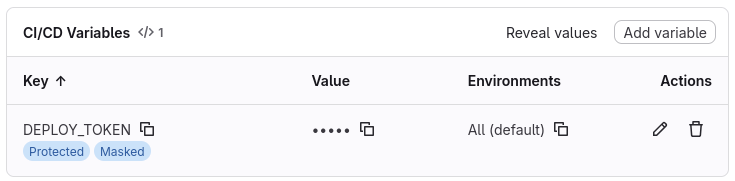
Secrets
- Sensitive information (e.g. API keys, passwords, etc.)
- Should not be stored in the repository
- Use GitLab CI/CD variables with “Protected” and “Masked” options enabled
- Accessed as regular environment variables
Conclusion
- CI/CD pipelines automate the software delivery process
- GitLab CI/CD is one of the popular tools
- we only scratched the surface
- Other tools use similar concepts, just different syntax